
Multi-group workflows
Private BetaMulti-group workflows are currently in private beta. Contact your Kili representative to request access.
Overview
Multi-group workflows extend the standard multi-step review workflow with an additional layer: work groups. Instead of a single Label step feeding into a shared set of Review steps, a project is split into several work groups, each with its own Job Scope, its own Label and Review steps, and its own team assignments.
This is useful when different parts of your ontology require different expertise or different levels of quality control — for example, a specialized team reviewing one category of jobs more thoroughly than another, within the same project.
Core concept: work groups
A multi-group workflow is composed of one or more work groups, executed sequentially — one group's steps don't run in parallel with another's.
Each work group has:
- A defined Job Scope — the jobs it covers
- Exactly 1 Label step
- 0 to N Review steps
- Its own team assignments
For everything related to how Label and Review steps behave individually — sampling, reviewer assignment, statuses — see Workflow configuration; that content applies the same way inside each work group.
Scoping and send-back rules
- Each work group's Job Scope can be as broad or as narrow as needed, and scopes can overlap across groups when your ontology calls for it.
- Send-back is bounded to the group it happens in: a reviewer in one work group can send an asset back to a previous step in that same group, but not into another group's steps.
A user assigned to a step in one work group does not automatically gain permissions in another. Team assignment and responsibility are scoped per group.
Team assignment & visibility
- Labelers and reviewers are assigned per step, within a work group — there's no default or inherited assignment across groups.
- Depending on your project's annotation visibility setting, users may see only annotations within their own group's Job Scope, or see other groups' annotations in read-only mode.
- In all cases, users can only create, edit, validate, or send back annotations within their own group's scope.
Example: reviewing a multi-section contract
Consider a document project where each contract is split into sections that call for different expertise and different levels of scrutiny:
- Work group "Clauses" — Job Scope:
clause-type,obligation,defined-term. Labeled by a legal-trained team, with 2 Review steps given the importance of getting contractual language right. - Work group "Signatures" — Job Scope:
signature-block,date,witness. Labeled by an operations team, with 1 Review step. - Work group "Appendices" — Job Scope:
appendix-reference,attachment-type. 1 Label step, no Review step, since this content carries lower risk.
Each group runs its own Label → Review sequence, with its own assigned team, before the next group's steps begin.
Setting up a multi-group workflow
From the Workflow editor:
-
Click Add work group to create a new group, and name it (e.g. "Clauses").
-
Define the group's Job Scope by selecting which jobs it applies to.
-
Configure its Label step (assign labelers, set sampling) and add Review steps as needed.
-
Repeat for each additional work group — they'll run in the order they appear.
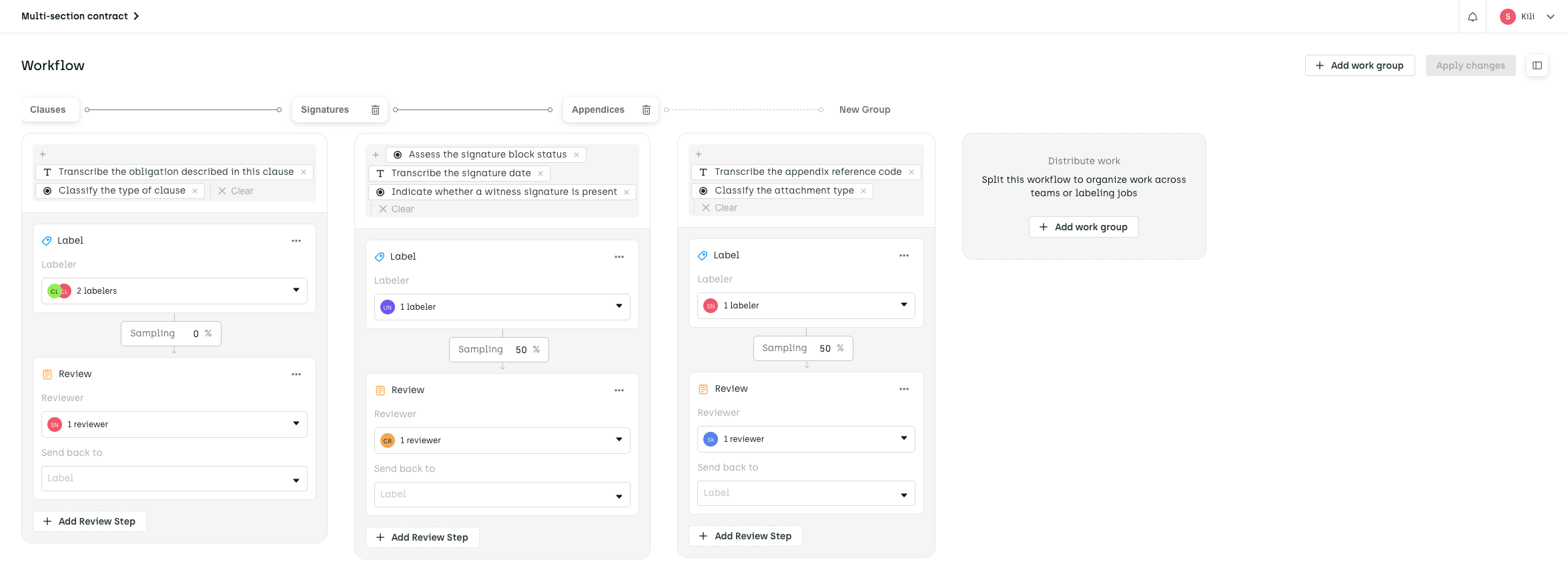
The Clauses, Signatures, and Appendices work groups configured as separate Label → Review sequences.
👉 For details on configuring individual steps once a work group is set up, refer to Workflow configuration.
Updated about 1 month ago